What is Add Subtitle.ai?
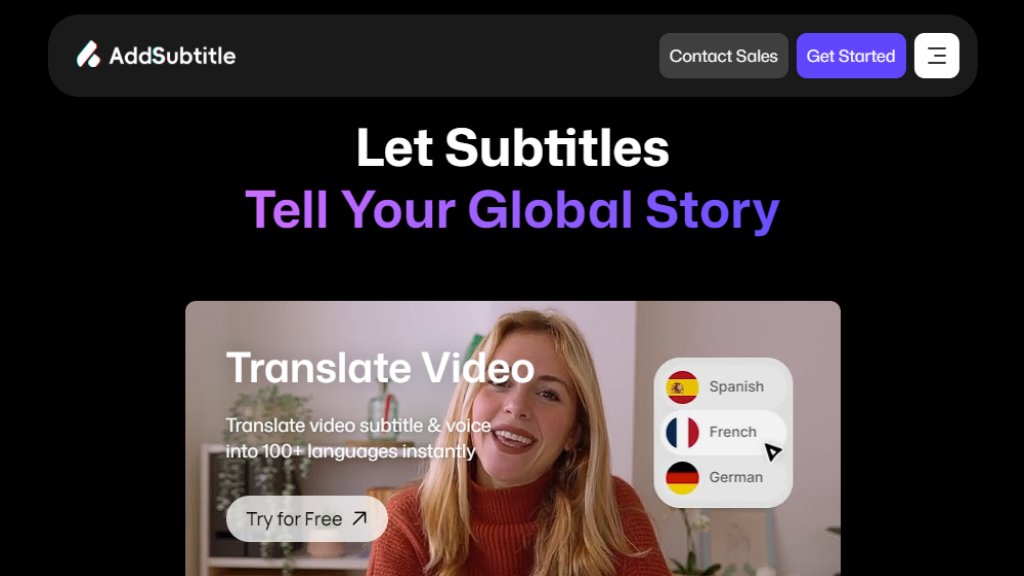
Add Subtitle.ai is a comprehensive online video editing platform powered by advanced artificial intelligence. Its core purpose is to simplify and automate the process of adding subtitles and translating video content for a worldwide audience. The tool goes beyond basic captioning by integrating features like intelligent voice dubbing, video script rewriting, and multilingual subtitle styling. It is designed for content creators, marketers, educators, and businesses who need to make their videos accessible and engaging across different languages and regions. By handling transcription, translation, and synchronization automatically, it significantly reduces the time and technical skill required for professional-grade video localization.
Main Features
1. Automated Subtitle Generation: Intelligently transcribes speech from videos and creates accurate, time-synced subtitles.
2. Multilingual Translation: Instantly translates video subtitles and voiceovers into over 100 languages.
3. Video Dubbing and Voiceover: Replaces the original audio with a translated voiceover that matches lip movements for a natural look.
4. Video Rewrite: Allows users to edit the video's script text, and the tool automatically adjusts the spoken audio and lip sync to match the new dialogue.
5. Subtitle Customization: Offers powerful styling tools to customize subtitle fonts, colors, and backgrounds to match brand identity.
6. Cloud-Based Editing: Provides an intuitive online editor for convenient access and collaboration without software installation.
Use Cases
1. Social Media Content Creation: Quickly add engaging captions to TikTok, YouTube, Instagram, and Facebook videos to boost accessibility and viewer retention.
2. E-Learning and Online Courses: Translate and subtitle educational materials to make courses available to international students.
3. Marketing and Corporate Videos: Localize promotional videos, product demos, and company announcements for different regional markets.
4. Content Localization for Agencies: Efficiently handle subtitle and dubbing projects for multiple clients and languages.
5. Independent Filmmakers and Vloggers: Add professional bilingual subtitles and explore creative video rewriting for storytelling.
Pricing Plans
1. Standard Plan: Free. Includes 30 credits per month, 3 voice clones, 7-day cloud storage, support for videos up to 20 minutes and 200MB. Exports contain a watermark.
2. Starter Plan: $6.9 per month (billed monthly) or $9.9 per month (billed annually). Includes 200 credits, 5 voice clones, 180-day storage, 30-minute video duration, 300MB size, watermark-free exports, lip sync, and priority support.
3. Creator Plan: $13.9 per month (billed monthly) or $19.9 per month (billed annually). Includes 500 credits, unlimited voice clones, permanent cloud storage, 60-minute video duration, 500MB size.
4. Enterprise Plan: Custom pricing. Offers unlimited credits, unlimited video duration and size, API/SDK access, private deployment, and a dedicated account manager.
Frequently Asked Questions
1. Q: What can I do with credits?
A: Credits are consumed for different features. For example, adding subtitles uses about 5 credits per minute, while translating video uses about 10 credits per minute.
2. Q: How accurate is the automatic subtitle generation?
A: The platform uses intelligent speech recognition technology known for high accuracy. It also provides an easy-to-use editor for manual proofreading and corrections.
3. Q: Does it support lip-syncing for dubbed videos?
A: Yes, the video dubbing and rewrite features include advanced lip-sync technology to make the translated speech match the speaker's mouth movements naturally.
4. Q: What video formats and sizes are supported?
A: Supported formats include MP4, MOV, AVI, and more. The maximum video size and duration depend on your subscription plan, ranging from 200MB/20min on the free plan to unlimited for Enterprise.
Pros and Cons
Pros:
1. Offers a powerful and convenient free plan for basic testing and light use.
2. Combines multiple features (subtitling, translation, dubbing, rewriting) in one integrated platform.
3. Supports an extensive range of over 100 languages for global reach.
4. The online interface is intuitive and fast, requiring no software download.
5. Provides innovative tools like video rewriting and lip-sync dubbing not commonly found together.
Cons:
1. Higher-tier features and adequate usage volume require a paid subscription.
2. The credit system may require users to calculate their needs across different functions.
3. Advanced features like API access and unlimited usage are reserved for the custom-priced Enterprise plan.
Recommendation Rating
8/10 (A powerful, all-in-one solution for automated video localization, ideal for creators and businesses expanding their global content reach.)





Please login to post a comment
Login