What is AI GIF Generator by FaceSwapVideo?
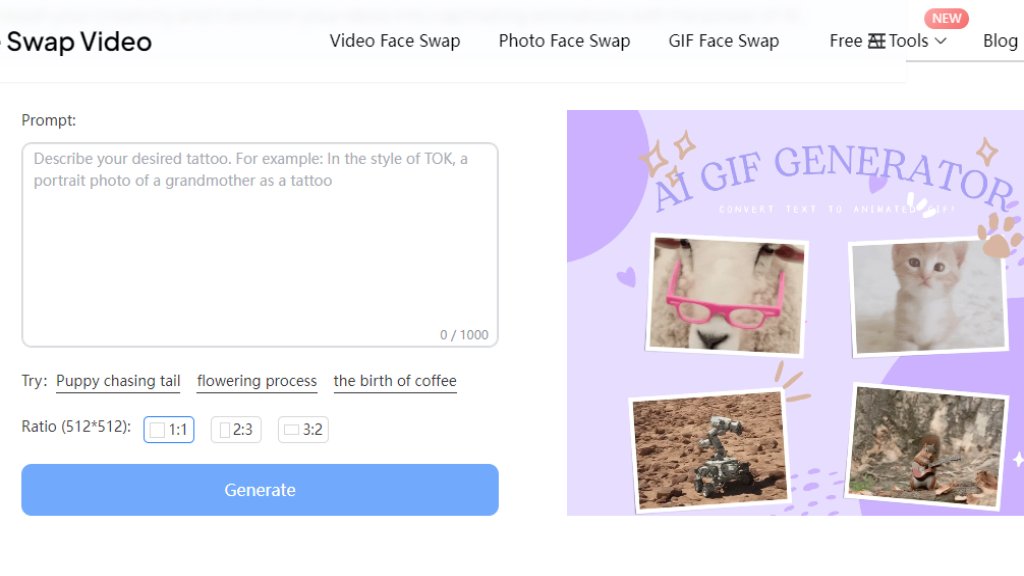
The AI GIF Generator by FaceSwapVideo is an online tool that converts text descriptions into animated GIFs using advanced artificial intelligence. This platform allows users to describe any scene, concept, or action in text, and the system automatically generates a corresponding animated GIF. It operates entirely through a web browser without requiring software downloads, making it accessible from both desktop and mobile devices. The tool is designed for simplicity, enabling users without graphic design or animation experience to create professional-looking GIFs quickly. As part of the FaceSwapVideo.ai suite, it focuses on automated content creation, transforming written ideas into visual animations for various personal and professional applications.
Main Features
1. Text-to-GIF Conversion: Users input text descriptions to generate unique animated GIFs, providing creative flexibility.
2. Customizable Aspect Ratios: Offers multiple ratio options including 1:1, 2:3, and 3:2 for different platform requirements.
3. Fast Processing: Generates high-quality GIF animations within seconds for quick content creation.
4. Browser-Based Platform: No software installation required, accessible directly through web browsers on any device.
5. Mobile Responsive: Fully functional on both desktop computers and mobile devices for on-the-go creation.
6. User-Friendly Interface: Simple three-step process (input, customize, generate) designed for all skill levels.
Use Cases
1. Social Media Content: Create engaging animated posts for platforms like Twitter, Instagram, and Facebook to increase audience engagement.
2. Digital Marketing: Produce eye-catching promotional GIFs for email campaigns, advertisements, and website content.
3. Personal Projects: Generate fun animations for personal messages, greetings, or creative expressions.
4. Presentation Enhancement: Add animated elements to business or educational presentations to make them more dynamic.
5. Website Content: Create animated graphics for blogs, articles, or landing pages to improve visual appeal.
6. Quick Prototyping: Rapidly visualize concepts or ideas through animation during brainstorming sessions.
Pricing Plans
1. Free Plan: The AI GIF Generator is currently available for free use without any mentioned paid plans or subscription requirements.
Frequently Asked Questions
1. Q: How do I generate GIFs using this tool?
A: Enter your text description in the designated area, select your preferred GIF ratio, and click the 'Generate' button.
2. Q: Is there a limit to the GIF description length?
A: Yes, text descriptions are limited to approximately 1000 characters and should be reasonably arranged.
3. Q: Can I use AI GIF Generator on mobile devices?
A: Yes, the platform is fully responsive and works on both desktop and mobile devices through web browsers.
4. Q: Do I need any prior design experience?
A: No, the tool is designed for users of all skill levels with an intuitive interface and automated creation process.
Pros and Cons
Pros:
- Completely free to use with no hidden costs or subscriptions
- Extremely fast generation process saves time
- Simple three-step workflow requires no technical expertise
- Accessible on any device with internet connection
- Multiple aspect ratios accommodate different platform needs
Cons:
- Limited to text input only (no image upload options)
- Character limit may restrict detailed descriptions
- Output quality depends on text description clarity
- No advanced editing features for generated GIFs
Recommendation Rating
8/10 (Excellent free tool for quick GIF creation from text, though limited to basic functionality)



Please login to post a comment
Login