
PhotoCat AI Face Swap
Free Realistic Face Swapping Online
Free online AI face swap tool for realistic and fun photo edits. Swap faces instantly with built-in templates, multi-face support, and no watermarks.
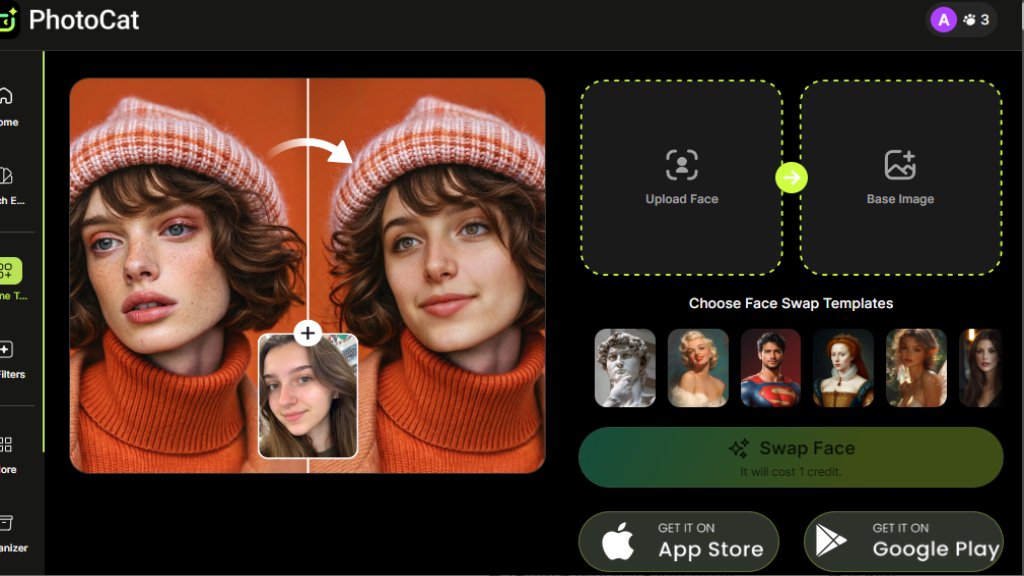
PhotoCat AI Face Swap Analysis
Introduction
What is PhotoCat AI Face Swap?
PhotoCat AI Face Swap is an intelligent online tool that allows users to seamlessly replace faces in photos. It uses automated technology to blend facial features naturally into new images or templates. The platform operates entirely through a web browser, requiring no software installation, and emphasizes accessibility with its free core service. Users can upload their own photos or select from various built-in scenarios to create entertaining, realistic, or practical face-swapped images in seconds.
Main Features
1. Completely free online access with no subscription required for basic face swapping.
2. Delivers realistic and lifelike results that blend faces organically without obvious edits.
3. Supports swapping multiple faces within a single group photo.
4. Offers a library of built-in templates for quick meme creation, movie poster scenes, and more.
5. Allows full customization by uploading both the source face and the target image.
6. Provides fast processing for instant transformation after uploading images.
7. Ensures user-friendly operation with no advanced editing skills needed.
Use Cases
1. Entertainment and Fun: Create humorous memes, prank friends, or generate funny content for social media.
2. Gender Swap Exploration: Visually explore an alternate appearance by swapping gender in photos.
3. ID Photo Creation: Generate perfect passport or ID photos by placing your face onto a professional template.
4. Virtual Try-On: Preview how outfits or styles look by swapping your face onto model photos before shopping.
5. Creative Content: Insert yourself into iconic movie posters, historical scenes, or fantasy scenarios.
6. Presentation and Design: Use face swapping for creative slides, digital art, or personalized projects.
Pricing Plans
1. Free Plan: Offers basic face swapping functionality at no cost with online access.
2. Meowber Pro (Weekly): $6.99 for 7 days, providing 100 credits per week for all AI tools, ad-free experience, and priority rendering.
3. Meowber Pro (Yearly): $59.99 for 1 year, offering the same features as the weekly plan at a discounted annual rate.
Frequently Asked Questions
1. Q: How do I swap heads in a photo using AI Face Swap?
A: Upload your image and the target photo or template; the tool automatically blends faces with precision.
2. Q: Can I upload my own target face for swapping?
A: Yes, the tool allows full customization by uploading your own photos or using built-in templates.
3. Q: How can I get the best face swap results?
A: Use clear, high-quality photos with good lighting and frontal faces for optimal blending.
4. Q: Will the face-swapped photo have a watermark?
A: No, results from the free face swap tool do not include watermarks.
5. Q: Is the face swap result realistic? Will it look natural?
A: Yes, the AI is designed to create organic and realistic blends without unnatural edges.
Pros and Cons
Pros:
- Entirely free for core face swapping with no hidden costs.
- Produces impressively realistic and seamless results.
- Extremely convenient and fast online tool, no download needed.
- Supports multiple face swaps in group photos.
- User-friendly interface suitable for beginners.
- Offers creative built-in templates for instant fun.
Cons:
- Advanced features and higher usage require a paid Pro subscription.
- Results depend heavily on input photo quality.
- Limited offline functionality as it is a web-based tool.
Recommendation Rating
8/10 (A powerful and fun free tool for realistic face swaps, ideal for casual users and content creators, though heavy users may need the Pro plan.)


Please login to post a comment
Login