What is Bing Image Creator?
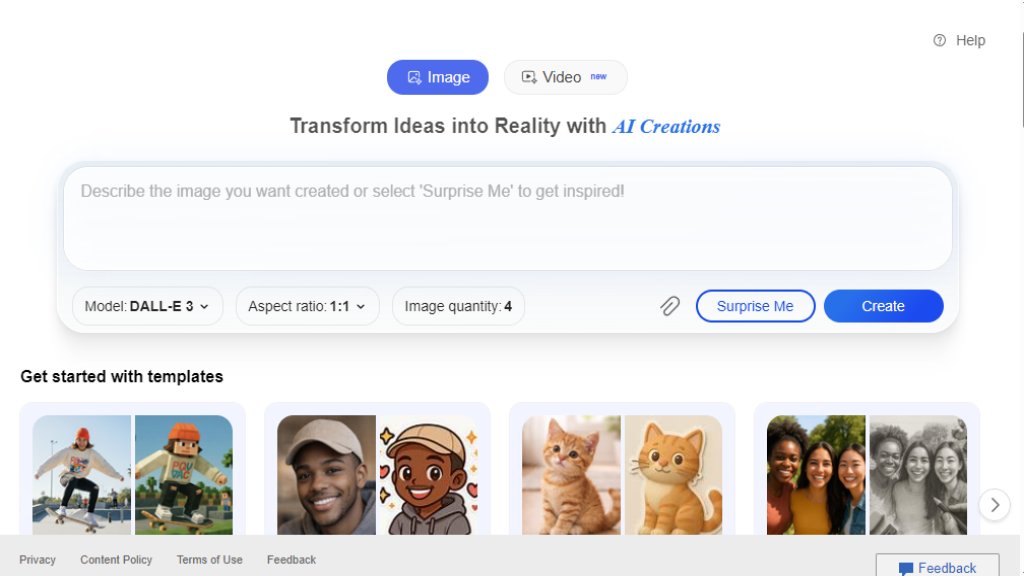
Bing Image Creator is a cutting-edge, free AI-powered tool. It turns your words and uploaded images into amazing visuals. Whether for realistic or artistic needs, it's great for quick and easy image creation or editing.
Main Features
- Multiple models: Offers DALL-E3, GPT4o, and MAI-Image-1. Different models for various creation styles. - Two creation speeds: Fast (15 free per day) and Standard. Fast for quick results, Standard for free when you don't mind waiting. - Image editing: Allows enhancing, remixing, and reimagining uploaded images. - Over 100 language support: Enables users worldwide to create.
Use Cases
- Creative projects: Artists can generate unique concepts for paintings, illustrations. - Marketing: Create eye-catching visuals for ads, social media posts. - Education: Teachers can make educational images for lessons. - Personal use: Design custom greeting cards, wallpapers.
Supported Languages
- Over 100 languages. For a full list, check Microsoft Translator.
Pricing Plans
- Free: 15 fast creations per day. Unlimited standard creations. - Microsoft Rewards: Use points to get more fast creations after using free ones.
Frequently Asked Questions
- Q: What is Bing Image Creator?
A: An AI-powered tool that turns words and images into visuals. - Q: How do I use Bing Image Creator?
A: Sign in with a Microsoft Account (not Microsoft Entra ID). - Q: How long will my uploaded images be saved?
A: Up to 30 days. Images with faces are deleted after 30 days; without faces, up to 18 months.
Pros and Cons
Pros:
- Free with multiple creation options. - Multiple models for diverse styles. - Over 100 language support. Cons:
- Limited free fast creations per day. - May generate unexpected content.
Recommendation Rating
7/10. It's a powerful and free tool with multiple features, but has some limitations like limited fast creations.



Please login to post a comment
Login