What is CapCut?
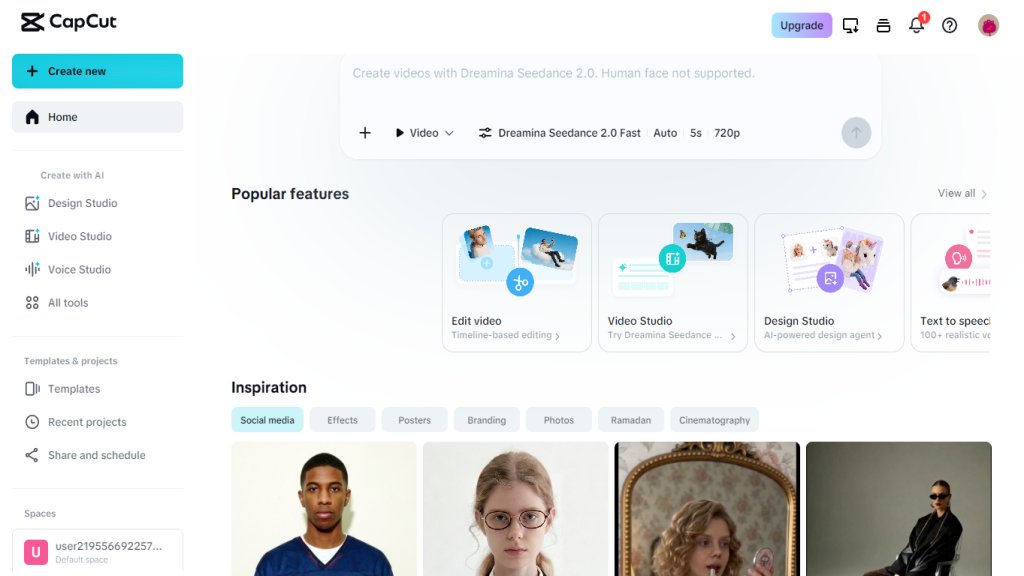
CapCut is a powerful, all-in-one AI video editor and image generator designed for everyone. It provides a suite of automated tools for editing videos, creating images, generating voiceovers, and designing graphics. With features like AI video generation from text, smart background removal, auto-captions, and a vast library of templates, CapCut simplifies content creation for social media, marketing, and personal projects. It is available as an online editor, mobile app, desktop app, and tablet version, making it accessible across devices. CapCut is known for its ease of use, powerful AI capabilities, and free access to most features, catering to both beginners and professionals.
Main Features
- AI Video Generator: Turn text, images, or keyframes into videos automatically.
- AI Image Generator: Create custom visuals from text prompts or reference images.
- AI Design: Generate professional layouts for social media posts, covers, and marketing materials.
- Text to Speech: Convert text into natural-sounding AI voices for narration and voiceovers.
- Background Remover: Remove image and video backgrounds instantly with AI in one click.
- Auto Captions: Add accurate subtitles to videos in multiple languages automatically.
- Video Editor: Cut, trim, merge, add transitions, and export HD videos without watermarks.
- Image Enhancer: Improve photo quality and resolution with AI.
- Templates: Access thousands of customizable templates for social media, business, and events.
- Audio Tools: Extract audio, remove noise, and enhance voice quality with AI.
Use Cases
- Social Media Content Creation: Create trending videos for TikTok, Instagram Reels, and YouTube Shorts.
- Marketing and Advertising: Produce promotional videos, ads, and business presentations.
- Vlogging and Lifestyle: Edit travel vlogs, daily life clips, and personal projects with smart tools.
- Education and Training: Generate educational videos with auto-captions and voiceovers.
- E-commerce: Remove backgrounds from product photos and create professional listings.
- Event Recap: Automatically compile video clips into summary videos with music and effects.
Supported Languages
- English
- Spanish
- French
- German
- Portuguese
- Italian
- Dutch
- Russian
- Japanese
- Korean
- Chinese (Simplified)
- Chinese (Traditional)
- Arabic
- Hindi
- Indonesian
- Thai
- Vietnamese
- Turkish
- Polish
- Swedish
Pricing Plans
- Free Plan: Access to basic editing tools, templates, and limited AI features with watermarks on some exports.
- Pro Plan: $7.99/month or $74.99/year, includes advanced AI features, no watermarks, priority export, and more templates.
- Team Plan: $100.99/year per user, adds collaboration features and team management.
- Enterprise Plan: Custom pricing for large organizations with dedicated support and advanced security.
Frequently Asked Questions
- Q: Is CapCut free to use?
A: Yes, CapCut offers a free version with many features. Some advanced tools and no-watermark exports require a Pro subscription.
- Q: Can I use CapCut online without downloading?
A: Yes, CapCut Online is a web-based editor that works in your browser without any downloads.
- Q: Does CapCut support text-to-speech?
A: Yes, CapCut has a text-to-speech feature that converts text into natural AI voices in multiple languages.
- Q: Can I remove backgrounds from videos?
A: Yes, CapCut provides an AI video background remover that works in one click.
- Q: What platforms is CapCut available on?
A: CapCut is available as a mobile app (iOS/Android), desktop app (Windows/Mac), online web editor, and tablet version (CapCut Pad).
Pros and Cons
Pros:
- Comprehensive all-in-one tool for video, image, and audio editing.
- Intuitive interface suitable for beginners and professionals.
- Extensive library of free templates and effects.
- Strong AI features like auto-captions, background removal, and text-to-speech.
- Cross-platform availability (online, mobile, desktop).
Cons:
- Some advanced features require a paid subscription.
- Free version includes watermarks on certain exports.
- Online version may require a stable internet connection.
- Limited advanced editing features compared to professional desktop software.
Recommendation Rating
9/10 (Powerful, free, and easy-to-use AI editing tool for social media creators, with minor limitations in the free tier.)



Please login to post a comment
Login