What is Norton Neo?
Norton Neo is the world's first AI native browser, designed to transform the standard web browsing experience. It integrates intelligent features directly into the browser to help users navigate faster, think clearer, and stay protected. Unlike traditional browsers that rely on extensions for added functionality, Neo has built-in automation and context-aware tools that understand user intent. Its core philosophy centers on user privacy and control, ensuring that personal data, chats, and browsing history are processed and stored locally on the user's device. Backed by Norton's trusted security technology, it provides a powerful yet private alternative to mainstream browsers, aiming to reduce online noise and friction.
Main Features
1. Intelligent Search and Summarization: Delivers direct answers and context from the web instantly, moving beyond traditional blue links.
2. Local Data Processing: Chats and browsing history are stored locally on your device, keeping your personal information private and under your control.
3. User-Controlled Memory: You decide what the browser remembers or forgets, with the option to turn memory features off entirely for maximum privacy.
4. Norton Web Shield Integration: Proactively blocks malicious websites and phishing attempts before you click, leveraging Norton's security expertise.
5. Tab and Workspace Organization: Automatically shrinks and organizes tabs to reduce clutter and surface what matters, promoting clarity and focus.
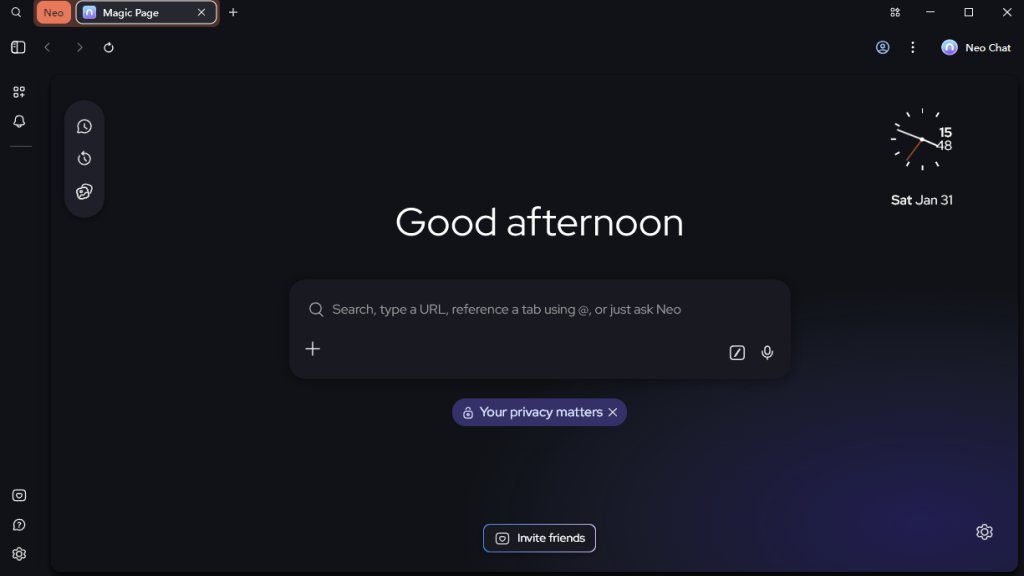
6. Personalized Inspiration Feed: A reimagined start page that brings your world into focus with a feed shaped around your interests and inspirations.
Use Cases
1. Academic Research and School Projects: Students can gather information quickly using intelligent search and summaries, saving time on research.
2. Professional Work and Content Creation: Professionals and creators can efficiently research video ideas or gather data without managing dozens of open tabs.
3. Everyday Browsing and Shopping: Users seeking a calmer, more organized web experience with built-in security for streaming, shopping, and connecting.
4. Privacy-Conscious Navigation: Individuals who prioritize data privacy and want full control over their digital footprint and browser memory.
5. Multitasking and Productivity: Anyone looking to reduce friction and gain momentum in their daily online tasks through automated organization and fast answers.
Supported Languages
1. The primary language showcased on the website and for the user interface is English. Specific support for additional languages is not detailed in the provided materials.
Pricing Plans
1. The provided website content does not list any specific pricing plans, subscription tiers, or one-time fees. The tool is presented as available for download without immediate mention of cost.
Frequently Asked Questions
1. Q: What is Neo?
A: Neo is the world's first AI Native browser designed to offer a powerful and private browsing experience without compromise.
2. Q: How is Neo different from other browsers?
A: Neo is built from the ground up with integrated intelligence, local data processing for privacy, and Norton security, unlike browsers that add AI via extensions.
3. Q: What platforms does Neo support?
A: Specific platform support is not listed in the provided content, but it is implied to be a desktop application available for download.
4. Q: Can I use Chrome extensions with Neo?
A: Compatibility with Chrome extensions is not explicitly confirmed or denied in the provided content.
Pros and Cons
Pros:
1. Strong emphasis on user privacy with local data storage and processing.
2. Integrated intelligent features for faster, more contextual web interaction.
3. Backed by Norton's reputable security technology for safe browsing.
4. User has granular control over the browser's memory and personalization.
5. Designed to reduce online clutter and improve focus and productivity.
Cons:
1. Limited information on supported platforms and operating systems.
2. Unclear compatibility with popular browser extensions from other ecosystems.
3. Pricing and long-term business model are not disclosed on the website.
4. As a new product, its market adoption and performance against established browsers are untested.
Recommendation Rating
7.5/10 (A promising and innovative browser for privacy-focused users seeking integrated AI, but more transparency on pricing and platform support is needed.)



Please login to post a comment
Login