
BeautyPlus Photo Restoration
Free Revive Your Cherished Memories
BeautyPlus Photo Restoration uses intelligent technology to automatically repair old, damaged photos. It removes scratches, tears, and stains, restores faded colors, and sharpens blurry images quickly and conveniently.
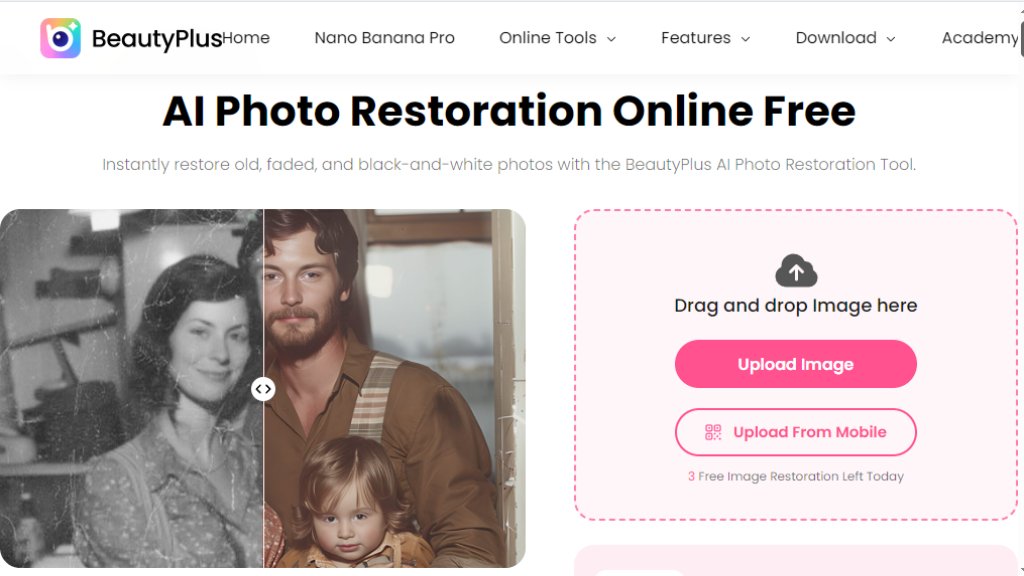
BeautyPlus Photo Restoration Analysis
Introduction
What is BeautyPlus Photo Restoration?
BeautyPlus Photo Restoration is an online tool designed to repair and enhance old or damaged photographs using advanced, automated technology. It specializes in breathing new life into precious memories that have suffered from the wear and tear of time. The tool is built to be user-friendly, requiring no professional editing skills. Users simply upload their photo, and the intelligent system analyzes and processes the image to address common issues like physical damage, color degradation, and loss of detail. It's a fast and accessible solution for anyone looking to preserve family history, restore sentimental portraits, or improve the quality of archival images without the complexity of manual photo editing software.
Main Features
- **Automated Damage Repair:** Intelligently removes scratches, dust spots, tears, and creases from scanned photographs.
- **Color Restoration and Enhancement:** Revives faded colors and can automatically colorize black and white photos for a vibrant look.
- **Image Sharpening and Deblurring:** Improves clarity and reduces blurriness to bring out lost details in old pictures.
- **Stain and Spot Removal:** Effectively eliminates water stains, mold spots, and other blemishes.
- **One-Click Processing:** Offers a simple, fast restoration process with minimal user input required.
- **Online Convenience:** A web-based tool accessible from any device with an internet connection, no software download needed.
Use Cases
- **Personal Memory Preservation:** Restoring old family portraits, wedding photos, or childhood pictures damaged over the years.
- **Genealogy and Historical Projects:** Enhancing the quality of ancestral photos for family trees or historical archives.
- **Sentimental Gift Creation:** Creating restored and printed versions of old photos as meaningful gifts for loved ones.
- **Document Digitization:** Improving the quality of scanned old documents or ID photos that have degraded.
- **Social Media Sharing:** Preparing clearer, more vibrant versions of old photos to share with friends and family online.
Frequently Asked Questions
- **Q: Is BeautyPlus Photo Restoration free to use?**
A: The tool offers both free and paid options. Free trials or basic repairs may be available, but full access to high-resolution downloads and advanced features typically requires a subscription or one-time purchase.
- **Q: What types of photo damage can it fix?**
A: It can effectively address common issues like scratches, tears, folds, dust, stains, color fading, and minor blurriness.
- **Q: How long does the restoration process take?**
A: The automated restoration is very fast, often taking just seconds to a minute per photo to process.
- **Q: What image formats are supported?**
A: It supports popular formats like JPG and PNG for upload and download.
- **Q: Do I need any technical skills to use it?**
A: No, the tool is designed for simplicity. The process is largely automated with an easy-to-use interface.
Pricing Plans
- **Free Plan/Trial:** Often includes a limited number of restorations, watermarked downloads, or lower-resolution results.
- **Subscription Plan (Pro):** Typically a monthly or annual subscription offering unlimited restorations, priority processing, high-resolution downloads without watermarks, and access to all advanced features.
- **Credit/Pack System:** Some models operate on a credit system where users purchase packs of credits to restore individual photos at a fixed rate per image.
Pros and Cons
Pros:
- Extremely user-friendly and requires no editing expertise.
- Fast, automated processing delivers quick results.
- Convenient online access from any device.
- Effectively handles a wide range of common photo damages.
Cons:
- Fully automated results may lack the nuanced touch of a professional manual restorer for severely complex damage.
- High-quality, watermark-free outputs usually require a paid plan.
- Limited manual control over the restoration process for users who want to fine-tune details.
Recommendation Rating
8/10 (A powerful and convenient tool for quickly restoring most common photo damages, ideal for personal use and casual restoration projects.)


Please login to post a comment
Login