What is PhotoCat Photo to Anime Converter?
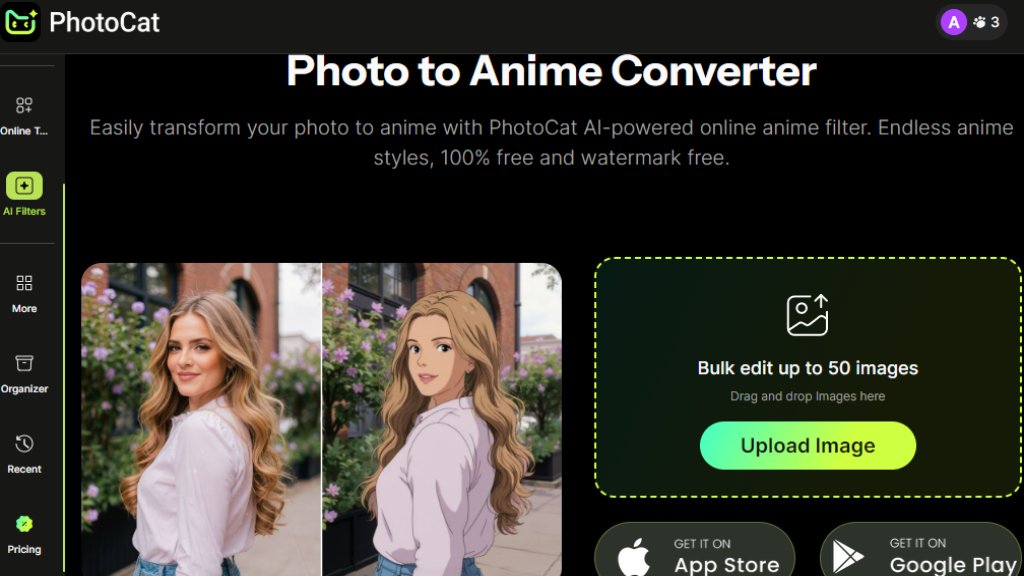
PhotoCat Photo to Anime Converter is an online tool that uses intelligent algorithms to transform ordinary photographs into anime-style artwork. This web-based application allows users to upload their photos and automatically convert them into various anime aesthetics without requiring any technical skills or software installation. The tool specializes in recreating images with the distinctive visual characteristics of anime art, including stylized features, vibrant colors, and artistic rendering. It operates entirely through a browser interface, making it convenient for quick transformations. The service emphasizes accessibility by offering free conversions with daily credits, while also providing enhanced options through subscription plans for users needing more extensive processing capabilities.
Main Features
1. Intelligent photo-to-anime conversion with automated style application
2. Multiple anime art styles and filters to choose from
3. Bulk processing capability for up to 50 images simultaneously
4. Drag-and-drop interface for convenient uploading
5. Watermark-free output on all processed images
6. Fast rendering with priority processing for premium users
7. Ad-free experience available through subscription plans
8. Daily free credits for basic usage without payment
Use Cases
1. Creating personalized anime avatars for social media profiles
2. Transforming portrait photos into unique anime artwork for gifts
3. Generating anime-style illustrations for creative projects
4. Converting family photos into animated keepsakes
5. Producing anime character designs for hobbyists and artists
6. Enhancing online content with customized anime imagery
7. Experimenting with different artistic styles on personal photographs
8. Batch processing multiple images for consistent anime transformations
Pricing Plans
1. Free Plan: Provides 5 credits daily for basic conversions
2. Meowber Pro (Weekly): $6.99 for 7 days with 100 weekly credits, ad-free experience, and priority rendering
3. Meowber Pro (Yearly): $59.99 for 1 year with same features as weekly plan at discounted rate
Frequently Asked Questions
1. Q: Is the Photo to Anime converter really free?
A: Yes, the tool offers free conversions with daily credits, though premium plans provide additional features.
2. Q: How many images can I process at once?
A: The bulk editor allows processing up to 50 images simultaneously for efficient workflow.
3. Q: Are there watermarks on the converted images?
A: No, all processed images are delivered without watermarks, even on the free plan.
4. Q: What anime styles are available?
A: The tool offers multiple anime aesthetics and filters to choose from for varied results.
5. Q: How fast is the conversion process?
A: Conversions are typically fast, with priority rendering available for premium subscribers.
Pros and Cons
Pros:
1. Completely free tier with daily credits available
2. No watermarks on output images
3. Bulk processing for multiple images
4. User-friendly drag-and-drop interface
5. Multiple anime style options
6. No software installation required
Cons:
1. Daily credit limits on free plan
2. Internet connection required for processing
3. Limited advanced customization options
4. Output quality may vary with input photo quality
Recommendation Rating
8/10 (Excellent free tool for anime conversions with convenient bulk processing)



Please login to post a comment
Login