What is wolai?
wolai is a modern, cloud-based collaboration and note-taking platform designed for both individuals and teams. It goes beyond traditional linear documents by organizing information into interconnected 'blocks'. Its core philosophy is to mimic the way the human brain associates ideas, creating a dynamic web of knowledge. It serves as a centralized workspace where users can manage projects, take notes, build wikis, track tasks, and collaborate in real-time across all devices. With a strong focus on the Chinese user experience and innovative features like block-level references and synced citations, wolai aims to be a powerful second brain for managing work, study, and personal life.
Main Features
1. Block-Level Editing and Bidirectional Linking: Content is created in movable blocks. You can create precise, two-way links between any blocks, building a true networked knowledge base.
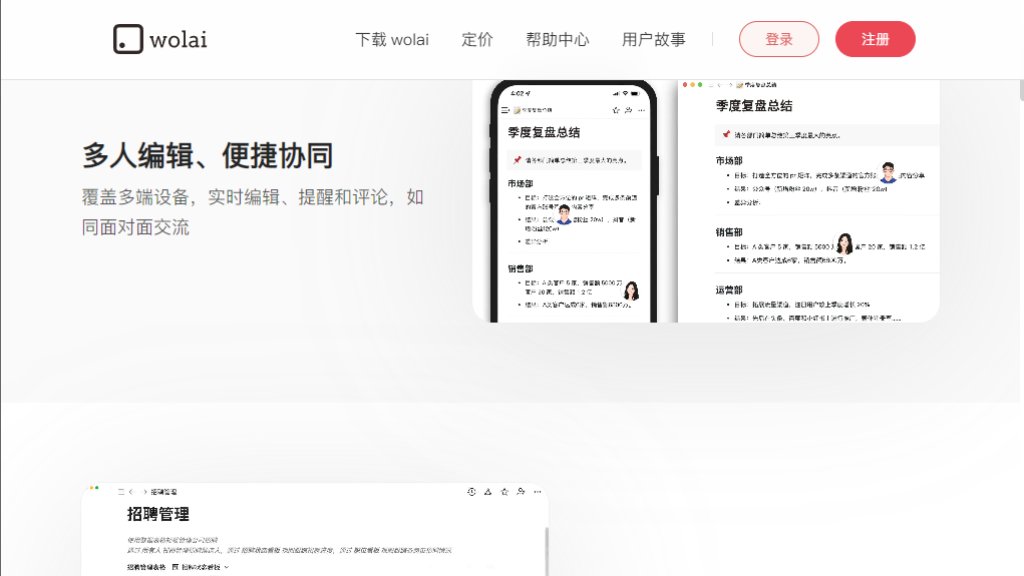
2. Real-Time Collaboration: Multiple users can edit the same page simultaneously, with live updates, comments, and reminders for smooth teamwork.
3. Powerful and Flexible Data Tables: Create tables that can be switched between Kanban, calendar, and gallery views. Supports column-level permissions for granular control.
4. Synced References: Reference the same block of content across multiple pages. When the original is updated, all references sync automatically.
5. Multi-Platform Support: Available via web browser and has dedicated desktop and mobile apps for Windows, macOS, iOS, and Android.
6. Granular Permissions and Version History: Control access down to the page, table row, or column level. A detailed version history tracks changes to every block.
7. Integrated AI Assistant (wol.AI): Provides intelligent writing assistance, summarization, and content generation within the platform.
Use Cases
1. Personal Knowledge Management: Build a personal wiki or second brain for study notes, research ideas, and life organization using bidirectional links.
2. Team Project Management: Plan projects, track tasks with data tables in multiple views, and collaborate on documentation in a shared space.
3. Company Wiki and Documentation: Create a centralized, easy-to-navigate knowledge base for company processes, onboarding, and team resources.
4. Meeting Notes and Minutes: Take structured notes during meetings and share them instantly with attendees for feedback and action items.
5. Content Creation and Planning: Brainstorm, outline, and write articles, reports, or scripts in a flexible, non-linear canvas.
6. Task and Habit Tracking: Use databases and tables to manage personal to-do lists, habit trackers, and reading lists.
Frequently Asked Questions
1. Q: Is there a free version?
A: Yes, wolai offers a free Personal plan with 1000 blocks, basic features, and support for up to 5 guest collaborators.
2. Q: What platforms are supported?
A: wolai is accessible via web browsers and offers native desktop applications for Windows and macOS, as well as mobile apps for iOS and Android.
3. Q: What is the difference between a 'page' and a 'block'?
A: A page is a container. A block is the fundamental unit of content inside a page, such as a paragraph, heading, image, or table. wolai's linking works at this precise block level.
4. Q: How does real-time collaboration work?
A: Multiple users can edit the same page at the same time. Changes are reflected instantly for all collaborators, who can also see each other's cursors and leave comments.
Pricing Plans
1. Personal Free: $0/year. Includes 1000 blocks, multi-device sync, basic blocks, and 5 guest collaborators.
2. Personal Pro: Approximately $22/year. Offers unlimited blocks, public sharing, more AI usage, 30-day version history, and 20 guest collaborators.
3. Team: Approximately $34/user/year. Includes all Pro features, 5GB file uploads, group management, 180-day version history, and enhanced column permissions.
4. Enterprise: Approximately $54/user/year. Provides all Team features, unlimited file uploads, custom domain, integration with DingTalk/WeChat Work, full audit logs, watermarks, and premium support.
Pros and Cons
Pros:
- Excellent Chinese language optimization and user interface.
- Innovative block-level bidirectional linking for superior knowledge networking.
- Powerful and versatile database/table functionality with multiple views.
- Real-time collaboration works smoothly across all platforms.
- Granular permission controls enhance data security for teams.
Cons:
- The free plan's 1000-block limit can be restrictive for serious users.
- Primarily popular in the Chinese market, with less global community support compared to some competitors.
- The learning curve for mastering advanced features like synced references and complex database setups.
Recommendation Rating
8.5/10 (A powerful and innovative all-in-one workspace, especially strong for Chinese users and teams seeking networked knowledge management and seamless collaboration.)



Please login to post a comment
Login