What is Yevideo?
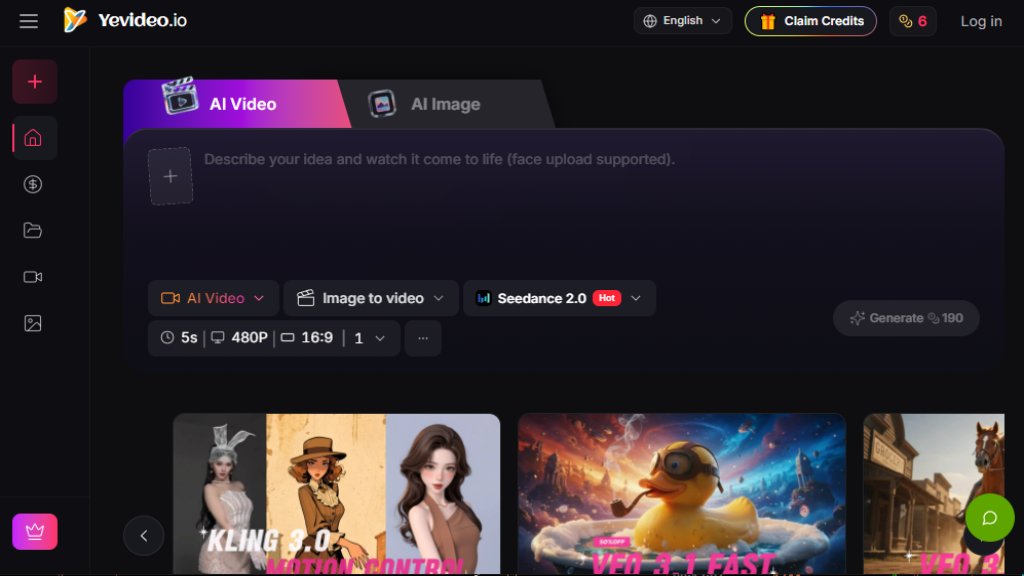
Yevideo is an innovative, all-in-one AI video and image creation platform that brings together a curated selection of top-tier AI models from various providers. It is designed to be a single studio where users can generate, edit, and transform both video and image content using intelligent automation. The platform supports a wide range of workflows, including text-to-video, image-to-video, video-to-video, text-to-image, and image-to-image. Yevideo distinguishes itself by offering specialized models for different needs, such as Seedance 2.0 for cinematic quality, Kling 3.0 for precise motion control, and Nano Banana Pro for design-grade images with excellent text rendering. It provides a user-friendly interface, fast generation speeds, and flexible pricing, making advanced AI creation accessible to everyone from beginners to professionals.
Main Features
- Multi-Model Integration: Access a variety of powerful AI video and image models (e.g., Seedance 2.0, Veo 3.1, Kling, Wan, Nano Banana, FLUX) in one unified workspace.
- Diverse Creation Workflows: Supports text-to-image, image-to-image, text-to-video, image-to-video, video-to-video, and AI video editing.
- Motion Control: Advanced models like Kling 3.0 allow for accurate motion imitation from reference videos.
- High-Quality Output: Models like Veo 3.1 Quality and Seedance 2.0 produce cinematic videos with strong realism and camera control.
- Fast Generation: Options like Veo 3.1 Fast and Seedance 2.0 Fast provide rapid results for quick iterations.
- Image-to-Video: Easily convert static images into dynamic video content with coherent motion.
- Video Editing: Edit existing videos by modifying elements, removing objects, or changing environments using natural language instructions.
- Text Rendering: Models like GPT-4o Image and Nano Banana Pro excel at generating images with accurate and readable text.
- Consistent Style: FLUX model ensures high consistency across multiple generated images.
- User-Friendly Interface: An intuitive platform that simplifies the selection of models and settings for different tasks.
- Commercial Use Rights: Paid plan subscribers can use generated outputs for commercial purposes.
Use Cases
- Marketing and Advertising: Create professional video ads, social media content, and promotional materials quickly.
- Content Creation: Generate engaging videos for YouTube, TikTok, and other platforms with diverse styles and effects.
- Product Demonstrations: Turn product images into dynamic explainer videos.
- Art and Design: Produce concept art, posters, and visual assets with precise text and style control.
- Filmmaking: Use motion control and video editing features to create or modify scenes for short films.
- Education and Training: Develop instructional videos and visual aids with consistent quality.
- E-commerce: Generate product visuals and promotional videos to enhance online listings.
- Personal Projects: Create custom videos and images for events, gifts, or creative expression.
Supported Languages
- English (primary interface language)
- The platform's AI models support generation in multiple languages, including but not limited to English, Chinese, and others, depending on the specific model's capabilities.
Pricing Plans
- Free: $0/month. Includes daily check-in bonus (100 credits/month), up to 2 videos/month, up to 25 images/month, watermarked outputs, standard support.
- Lite (Yearly): $10/month (billed annually). 300 credits/month, up to 7 videos/month, up to 75 images/month, no watermark, faster speed, priority support.
- Pro (Yearly): $14.5/month (billed annually). 800 credits/month, up to 20 videos/month, up to 200 images/month, 4 concurrent jobs, no watermark, priority support.
- Pro (Monthly): Starts at $29/month. 800 credits/month (with higher tiers available up to 500K credits/month). Includes all Pro features.
Frequently Asked Questions
- How do I choose the right model on Yevideo?
First, decide what you want to generate (AI video or AI image) and your priority (e.g., motion imitation, text rendering, style). Then read the model intro cards. For example, Kling 3.0 is great for motion imitation, while Nano Banana Pro handles text much better than Nano Banana.
- Can I turn a generated AI image into a video?
Yes. You need to download the generated image first, then upload it into the image-to-video workspace. This is recommended as it helps lock the mood and style, saving credits.
- How does pricing work? What does the estimated cost mean?
Each generation costs credits based on the selected model, resolution, duration, and number of outputs. The estimated credit cost is shown before generating. After completion, you can review actual credit changes in My Credits.
- How can I get more free credits?
You can get free credits through a welcome bonus for new users, daily check-ins, and feedback rewards. An invite program is also planned.
- Can I use outputs commercially? What should I watch for?
Yes, paid plan



Please login to post a comment
Login