
PhotoCat AI Image Enhancer
Free AI Image Upscaler & Enhancer
Free online AI image enhancer that upscales resolution, removes blur, and sharpens details instantly. No watermarks, batch processing, and automated enhancement for old photos, portraits, and text.
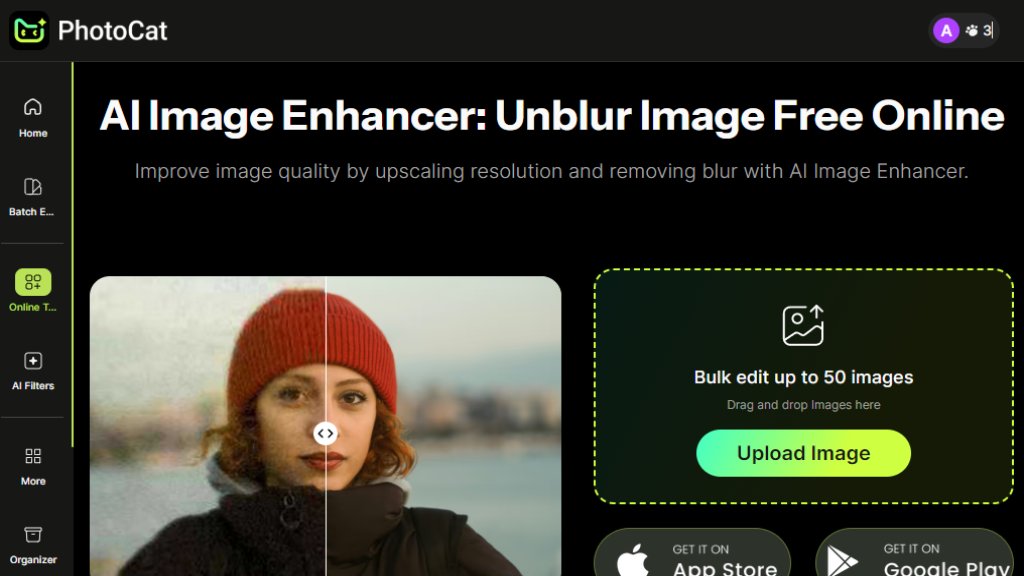
PhotoCat AI Image Enhancer Analysis
Introduction
What is PhotoCat AI Image Enhancer?
PhotoCat AI Image Enhancer is an intelligent online tool designed to improve image quality through automated enhancement. It specializes in upscaling low-resolution images to 4K, removing blur and noise, and sharpening details with a single click. The platform uses advanced algorithms to restore old photos, enhance portraits, and clarify text images without requiring any photo editing skills. It operates entirely through a web browser, offering a convenient solution for users who need quick image improvements for personal or professional use.
Main Features
1. Intelligent image upscaling that enlarges photos up to 4 times their original size.
2. Automated blur and noise removal to clean hazy or grainy pictures instantly.
3. Detail enhancement for faces and portraits, refining skin tones and facial contours.
4. Batch processing capability allowing users to upload and enhance up to 50 images simultaneously.
5. Support for multiple image formats including JPG, JPEG, and PNG.
6. Free usage without watermarks on enhanced images.
7. Fast processing with priority rendering for paid plans.
Use Cases
1. Restoring old family photos by bringing back vibrancy and removing decades of degradation.
2. Enhancing product photography to create crisp, professional images for e-commerce.
3. Clarifying blurry text images for documents, assignments, or online submissions.
4. Improving social media downloads that have lost quality through compression.
5. Upscaling low-resolution images for printing, presentations, or digital displays.
6. Retouching portraits and selfies by smoothing skin and enhancing facial details.
Pricing Plans
1. Free Plan: Offers 5 credits daily for enhancing images without watermarks.
2. Meowber Pro (Weekly): $6.99 for 7 days with 100 weekly credits, ad-free experience, and priority rendering.
3. Meowber Pro (Yearly): $59.99 for 1 year with same features as weekly plan at discounted rate.
Frequently Asked Questions
1. Q: What image formats does the AI photo enhancer support?
A: It supports JPG, JPEG, and PNG formats for all enhancement functions.
2. Q: Are there any limits on using the AI photo enhancer for free?
A: Yes, free users receive 5 credits daily to enhance 5 photos without watermarks.
3. Q: Can I restore and enhance photos in bulk?
A: Yes, the tool supports batch processing for multiple images simultaneously.
4. Q: Will the enhanced photos have a watermark?
A: No, both free and paid enhanced images are watermark-free.
5. Q: Can I use the AI photo enhancer on my iPhone?
A: Yes, the web-based tool works on all devices including iPhones through browsers.
Pros and Cons
Pros:
1. Completely free tier with daily enhancement credits.
2. No watermarks on processed images.
3. Batch processing saves time for multiple images.
4. Simple, automated interface requiring no editing skills.
5. Effective for various enhancement needs including old photos and text.
Cons:
1. Daily free credits are limited to 5 images.
2. Advanced features require subscription.
3. Web-based only, no dedicated desktop application.
4. Processing speed may vary with internet connection.
Recommendation Rating
8/10 (Powerful free tool for basic image enhancement with useful paid upgrades)




Please login to post a comment
Login