
BeautyPlus Bulk Image Upscaler
Free bulk image enhancement tool
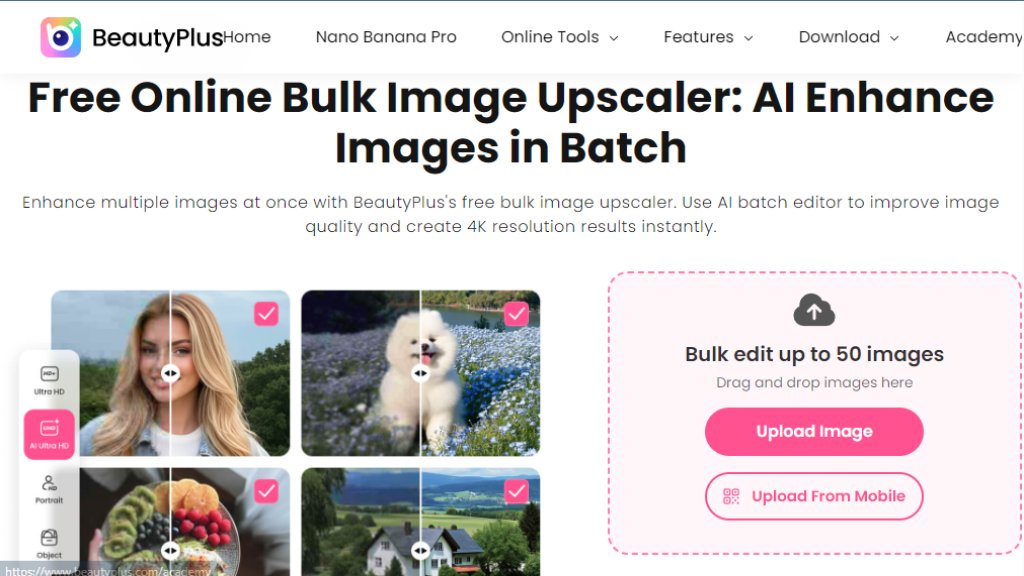
BeautyPlus Bulk Image Upscaler is a free online tool that intelligently enhances image resolution and quality in batches. It offers fast, automated upscaling for multiple images simultaneously, perfect for photographers and content creators.
BeautyPlus Bulk Image Upscaler Analysis
Introduction
What is BeautyPlus Bulk Image Upscaler?
The BeautyPlus Bulk Image Upscaler is a convenient online tool designed to increase the resolution and improve the overall quality of multiple images at once. It utilizes advanced algorithms to intelligently analyze and upscale photos, adding detail and clarity while reducing noise and blur. This tool is built for efficiency, allowing users to process numerous images in a single operation without the need for complex software installation. It is particularly useful for anyone needing to prepare a large set of images for print, web publication, or archival purposes, offering a streamlined solution to enhance visual content quickly and effectively.
Main Features
1. Batch Processing: Upload and upscale multiple images simultaneously, saving significant time and effort.
2. High-Quality Upscaling: Intelligent algorithms increase image resolution up to 4x while preserving and enhancing details.
3. Noise Reduction: Automated technology reduces grain and noise in photos for a cleaner look.
4. One-Click Operation: The process is simplified to an easy, single-step operation for user convenience.
5. Cloud-Based Platform: Access the tool directly from any web browser without downloading software.
6. Free to Use: The core upscaling service is completely free with no hidden costs or watermarks.
Use Cases
1. Social Media Content Creation: Enhance the quality of multiple product photos or lifestyle images before posting.
2. Professional Photography: Upscale batches of client photos for high-resolution prints or portfolios.
3. E-commerce Listings: Improve the clarity of numerous product images to attract more customers online.
4. Personal Archiving: Restore and enlarge old digital photos or family pictures stored in albums.
5. Marketing Materials: Prepare a large set of images for brochures, websites, or digital advertisements.
6. Hobbyist Projects: Increase the resolution of images for crafts, digital art, or blog illustrations.
Frequently Asked Questions
1. Q: Is the BeautyPlus Bulk Image Upscaler really free?
A: Yes, the image upscaling tool is completely free to use with no charges.
2. Q: How many images can I upscale at once?
A: You can upload and process multiple images simultaneously in one batch.
3. Q: What is the maximum upscale ratio?
A: The tool can upscale your images up to 4x their original resolution.
4. Q: Are there any restrictions on image size or format?
A: The website supports common image formats like JPG and PNG. There may be limits on file size for upload.
5. Q: Will my uploaded images be stored or used elsewhere?
A: According to their policy, uploaded images are processed securely and are not stored or used for other purposes.
Pricing Plans
1. Free Plan: The Bulk Image Upscaler is offered as a completely free service. Users can access all core upscaling features, including batch processing and high-quality enhancement, at no cost and without adding watermarks to the output images.
Pros and Cons
Pros:
1. Entirely free with no usage limits or watermarks.
2. Saves time with intelligent batch processing of multiple images.
3. User-friendly and convenient with a simple, web-based interface.
4. Delivers noticeable improvements in image resolution and clarity.
5. No software installation is required.
Cons:
1. Advanced customization options for upscaling parameters are limited.
2. Being an online tool, it requires a stable internet connection.
3. Processing speed for very large batches may depend on server load and connection.
4. Primarily focused on upscaling, with fewer all-in-one editing features compared to full software suites.
Recommendation Rating
8/10 (An excellent free solution for quick, bulk image upscaling with reliable quality, ideal for casual users and professionals needing a fast, straightforward tool.)




Please login to post a comment
Login