What is ImageEditor Online?
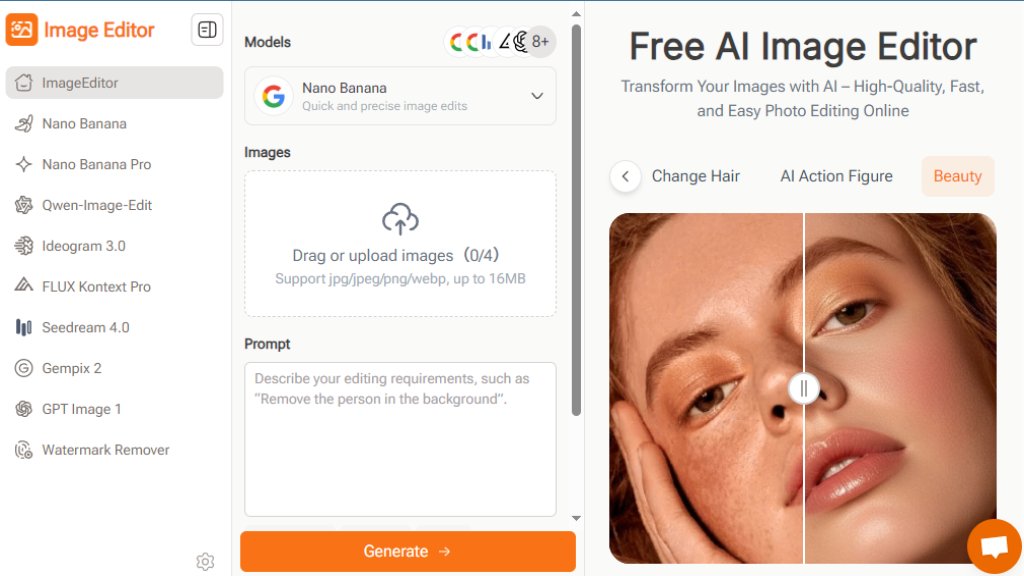
ImageEditor Online is a web-based, intelligent photo editing platform that simplifies image enhancement and transformation. It allows users to edit photos by describing their desired changes in natural language or selecting from hundreds of preset prompts. The tool leverages multiple automated models, such as Nano Banana and Flux Kontext, to perform complex edits like background removal, pose adjustment, clothing swaps, and artistic style application. Designed for convenience, it requires no software installation or advanced editing knowledge, making professional-grade visual creation accessible to bloggers, marketers, educators, and social media users directly from their browser.
Main Features
- **Natural Language Editing**: Describe edits in plain English; the AI interprets and executes commands for intuitive, codeless editing.
- **Multiple AI Models**: Access specialized models like Nano Banana for precision, Flux Kontext for creative effects, and Seedream for style, each optimized for different tasks.
- **Preset Prompts & Templates**: Choose from a vast library of ready-made styles and effects with one click, eliminating the need to craft perfect prompts.
- **One-Stop Continuous Workflow**: Perform multiple rounds of editing on an image within the same interface, refining details without switching tools.
- **Core Editing Tools**: Includes automated background removal, object removal, pose change, filter application, beauty enhancement, and aspect ratio adjustment.
- **High-Quality Free Export**: Download finished images in high resolution (up to 4K) for free, suitable for both digital and print use.
Use Cases
- **Social Media Content Creation**: Quickly generate eye-catching posts, stories, and banners by applying trendy filters, removing backgrounds, or creating cohesive visual themes.
- **E-commerce Product Photography**: Automate background removal, enhance product details, and create consistent, polished images for online listings and ads.
- **Educational Material Design**: Teachers and students can easily create clear diagrams, enhance instructional photos, and design engaging learning aids.
- **Marketing & Advertising**: Produce professional posters, flyers, and promotional graphics using style transfer and template prompts without a designer.
- **Personal Photo Enhancement**: Retouch portraits, change backgrounds, experiment with hairstyles or outfits, and apply artistic effects to personal photos.
- **Rapid Prototyping for Ideas**: Designers and content creators can visualize concepts and iterate on visual styles quickly before final production.
Frequently Asked Questions
- **Q: Is ImageEditor Online free to use?**
A: Yes, the core features are free, allowing users to edit images and download high-quality results. Some advanced features or higher resolution options may have limitations.
- **Q: Do I need design skills or software installation?**
A: No. The tool is designed for beginners, using simple text prompts. It runs entirely online in a web browser with no download required.
- **Q: How fast is the image processing?**
A: Edits typically complete in a few seconds to under a minute, depending on complexity, enabling fast workflow for multiple images.
- **Q: Can it handle product photos for an online store?**
A: Absolutely. It is ideal for tasks like background removal and detail enhancement to create clean, professional product images.
- **Q: What file formats and sizes are supported?**
A: It supports JPG, JPEG, PNG, and WEBP formats, with files up to 16MB in size.
- **Q: Can I merge multiple images?**
A: Yes, you can upload and merge several images into one for creating collages or composite visuals.
Pricing Plans
- **Free Plan**: Offers access to core AI editing models, preset prompts, basic editing tools, and high-quality downloads. Suitable for most personal and casual professional use.
- **Pro/Paid Tiers**: While not detailed in the provided material, such tools typically offer premium plans. These likely include higher resolution exports (e.g., 4K+), priority processing, access to more advanced AI models, increased upload limits, and removal of watermarks or usage caps.
Pros and Cons
Pros:
- Extremely user-friendly with a zero-learning-curve, prompt-based interface.
- Powerful, automated editing capabilities that rival complex software.
- Completely free for fundamental use with high-value output.
- Versatile application across many personal and professional scenarios.
- Fast processing speeds enhance productivity.
Cons:
- Free version may have restrictions on resolution or advanced features.
- Dependent on internet connectivity and server performance.
- Output quality can vary based on the input image and chosen prompt.
- Less granular control compared to professional desktop software like Photoshop.
Recommendation Rating
9/10 (An outstanding free tool that democratizes professional photo editing through intelligent automation, ideal for non-desig



Please login to post a comment
Login