What is AI Cartoon Generator?
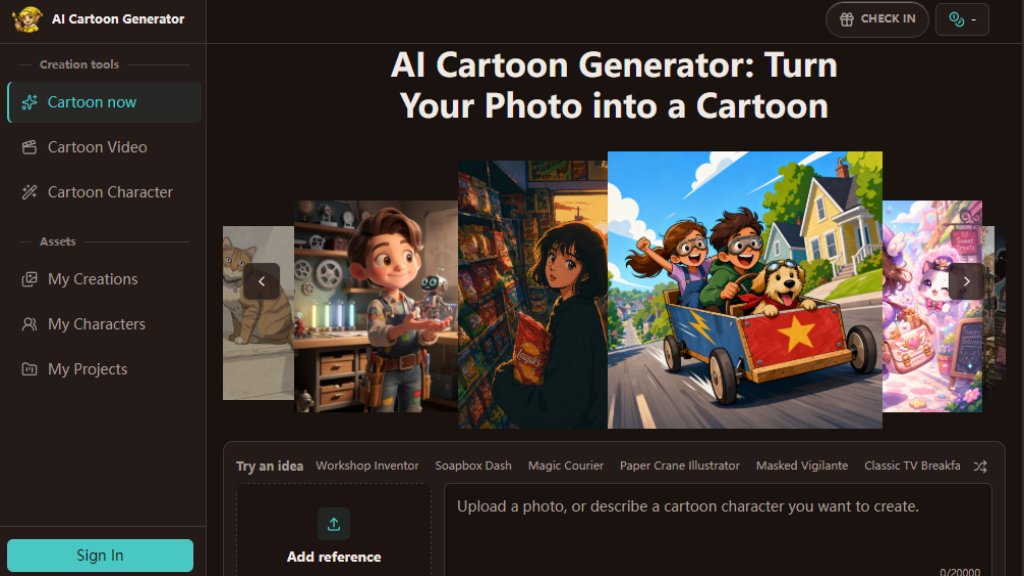
AI Cartoon Generator is an online tool that transforms photos or text prompts into cartoon-style images. It offers a variety of styles including 2D, 3D, and anime, allowing users to create avatars, portraits, characters, pet images, and scenes. The tool is designed for simplicity, providing a browser-based studio where users can upload a photo or write a description, choose a style, and generate a watermark-free result in seconds. It also supports batch generation and cartoon video creation.
Main Features
- Photo to Cartoon: Upload a selfie, pet photo, or any image to get a cartoon version with preserved details.
- Text to Cartoon: Describe a character or scene to generate an original cartoon without a source image.
- Multiple Styles: Choose from 2D, anime, Pixar 3D, and 3D Toon styles for different visual effects.
- Watermark-Free Results: Download generated images without watermarks for personal or commercial use.
- Free Trial: New users get free credits to test the tool before committing to a paid plan.
- Batch Generation: Create multiple images at once with concurrent task support.
- Cartoon Video Creation: Turn artwork into 8-second animated videos with motion and background sound.
- Online Studio: No software installation needed; all controls are in the browser.
Use Cases
- Social Media Avatars: Create recognizable cartoon profile pictures for platforms like Twitter, Discord, or gaming accounts.
- Content Creation: Generate unique visuals for blog posts, video thumbnails, channel art, and social media graphics.
- Character Design: Develop original characters for stories, games, or marketing campaigns using text prompts.
- Pet Portraits: Turn pet photos into playful illustrated keepsakes or shareable posts.
- Personalized Gifts: Create cartoon portraits or scenes for friends and family as unique presents.
- Storyboarding: Quickly visualize scene concepts for animation or video projects.
Supported Languages
- English
- French
- Japanese
- Spanish
- Chinese
- Italian
- Indonesian
- Korean
- German
Pricing Plans
- Starter Monthly: $9.9/month for 80 credits (up to 80 images or 8 videos), 1080P video, 3 concurrent tasks, commercial use.
- Standard Monthly: $19.9/month for 200 credits (up to 200 images or 20 videos), 1080P and 4K video, 5 concurrent tasks, commercial use.
- Premium Monthly: $39.9/month for 600 credits (up to 600 images or 60 videos), 1080P and 4K video, 10 concurrent tasks, commercial use.
- Starter Yearly: $7.99/month billed annually at $96 for 960 credits, 1080P video, 3 concurrent tasks.
- Standard Yearly: $15.99/month billed annually at $192 for 2400 credits, 1080P and 4K video, 5 concurrent tasks.
- Premium Yearly: $31.99/month billed annually at $384 for 7200 credits, 1080P and 4K video, 10 concurrent tasks.
- Pay-as-you-go Packs: Welcome Pack $5 for 100 credits; 100 credits $14.90; 300 credits $34.90; 500 credits $44.50; 1000 credits $69.90; 1500 credits $73.50. All packs valid for 1 year and include commercial use.
Frequently Asked Questions
- Is the AI cartoon generator free to use?
Yes, new users receive free credits to try image generation and compare styles. Generated images are watermark-free.
- Can I use the AI cartoon generator from text?
Yes, you can describe a character or scene to generate an original cartoon without a source image.
- Can I create an AI cartoon video for free?
Yes, free credits can be used to create 8-second cartoon videos.
- Does the cartoon maker work online?
Yes, it operates entirely in your browser with no software installation required.
- How do I make a 3D cartoon with AI?
Select a 3D style like Pixar 3D or 3D Toon, then upload a photo or enter a prompt to generate a dimensional cartoon.
Pros and Cons
Pros:
- Simple browser-based workflow with no software setup.
- Wide range of styles including 2D, 3D, and anime.
- Watermark-free downloads on all plans.
- Free trial credits for new users.
- Supports both photo and text inputs.
- Commercial use included in all paid plans.
Cons:
- Free credits are limited; paid plans required for heavy use.
- Video length is limited to 8 seconds.
- Some styles may not suit all image types perfectly.
Recommendation Rating
8/10 (A versatile and user-friendly tool for quick cartoon creation, though video features are limited and free credits are capped.)



Please login to post a comment
Login