What is TubeTutor?
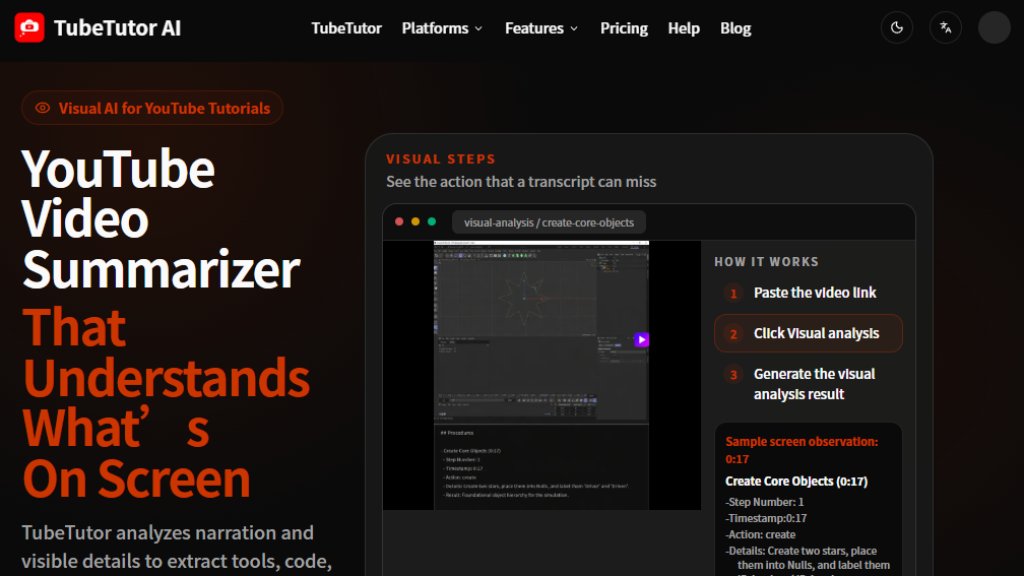
TubeTutor is an AI-powered YouTube video summarizer that goes beyond traditional transcript-based summaries. It analyzes both the spoken narration and the visual content on screen, such as interface text, code, menus, settings, and demonstrated actions. This allows it to extract structured tutorial steps with approximate timestamps and evidence descriptions, making it easier to understand and review complex tutorials. TubeTutor provides a connected learning workspace that includes visual steps, summaries, transcripts, mind maps, and notes, all linked to the original video. It is designed for software tutorials, coding lessons, AI workflow guides, and design tutorials where visual details are crucial. Users can paste a video URL, choose an output language, and generate a comprehensive analysis. The tool offers a guest preview and requires sign-in for saving projects and full visual analysis.
Main Features
- Visual Analysis: Extracts visible tools, text, code, and steps from the video screen, with approximate timestamps and evidence descriptions.
- Transcript Summary: Generates concise summaries of the spoken content.
- Timestamps: Provides approximate timestamps for each visual finding, helping users locate specific moments.
- Evidence Descriptions: Indicates whether a finding came from visible text, an object, an interface, or a demonstrated action.
- Connected Workspace: Integrates visual steps, summary, transcript, mind map, and notes in one interface.
- Mind Map Creation: Automatically generates a mind map of the tutorial's key points.
- Note Taking: Allows users to create and save notes linked to the video.
- Translation: Supports multiple output languages, including English, Chinese, Spanish, French, German, Portuguese, Japanese, and Korean.
- Export Options: Users can export their analysis and notes, with Notion-ready knowledge output.
- Guest Preview: Users can try the tool without a credit card, with a limit of two distinct videos per local day.
Use Cases
- Software Tutorials: Capture visible menus, controls, settings, and workflow changes alongside the presenter's explanation.
- Coding Tutorials: Keep terminal actions, code changes, errors, and implementation steps connected to the lesson.
- AI Workflows: Organize visible tools, prompt structure, configurations, and multi-step automation processes.
- Design Tutorials: Follow visual editing decisions, layer changes, interface controls, and the steps behind the final result.
- Educational Learning: Convert YouTube tutorials into structured study materials with summaries and mind maps.
- Content Review: Quickly review long videos by focusing on visual steps and timestamps.
- Language Learning: Use translated transcripts and summaries to understand tutorials in different languages.
- Note Preparation: Create comprehensive notes for personal or professional development.
Supported Languages
- English
- Simplified Chinese
- Traditional Chinese
- Spanish
- French
- German
- Portuguese
- Japanese
- Korean
These are the output languages for summaries and analysis. The original video language can be kept as well.
Pricing Plans
- Guest Preview: Free, allows up to 2 distinct videos per local day, no credit card required. Saving projects and Visual Analysis require sign-in.
- Paid plans: Pricing details are not explicitly listed on the website. Users are directed to view pricing on the pricing page, which may require contacting support or signing up. No specific numbers are provided.
Frequently Asked Questions
- Q: Where can I find the YouTube summary?
A: After pasting a video URL and running the analysis, the summary is generated and displayed in the TubeTutor workspace, accessible from your project dashboard.
- Q: Which app can summarize a YouTube video?
A: TubeTutor is a dedicated app that summarizes YouTube videos with visual analysis, providing summaries, transcripts, mind maps, and notes.
- Q: Is there an AI that can watch a video and summarize it?
A: Yes, TubeTutor uses AI to analyze both audio and visual content, making it capable of understanding what's on screen.
- Q: How do I summarize a YouTube video into text?
A: Paste the video URL into TubeTutor, select your output language, and click "Analyze". The tool will generate a text summary and transcript.
- Q: Can you use summary AI for free?
A: TubeTutor offers a free guest preview that allows up to 2 distinct videos per local day. For full features, sign-in is required.
Pros and Cons
Pros:
- Innovative visual analysis captures on-screen details that transcripts miss.
- Provides timestamps and evidence for each finding, enhancing credibility.
- All-in-one workspace with summary, transcript, mind map, and notes.
- Supports multiple languages, making it accessible globally.
- Guest preview allows testing without payment.
- Specifically designed for tutorial-heavy content.
Cons:
- Visual analysis may vary with video quality and layout.
- Timestamps are approximate, not exact.
-



Please login to post a comment
Login