What is AI Arch Generator?
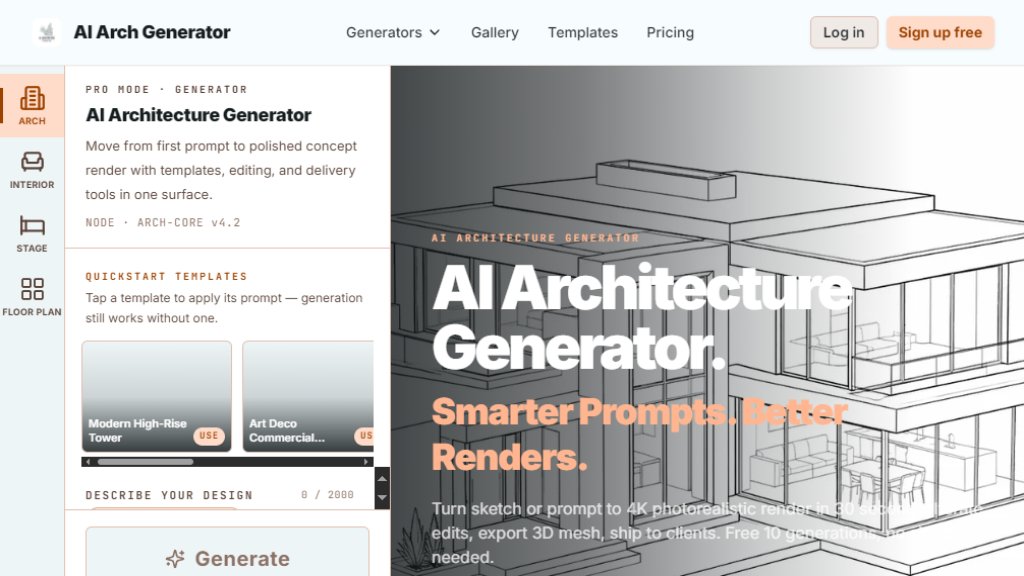
AI Arch Generator is an innovative AI tool designed for architects, interior designers, and students to transform sketches or prompts into high-quality 4K architectural renders in just 30 seconds. It offers both Pro Mode for full creative control and Template Mode for quick, one-click renders. The platform supports reference image upload, advanced keyword panels, and 3D mesh export, making it a comprehensive solution for architectural visualization and design iteration.
Main Features
- Pro Mode: Free-form prompts with 500-character text input, supporting technical jargon like BIM and parametric design.
- Template Mode: Over 50 curated templates for quick renders, including virtual staging for empty rooms.
- 4K Resolution: One-click enhance to 4096x4096 pixels for photorealistic quality.
- 3D Mesh Export: Download .glb files for use in Blender, SketchUp, or AR viewers.
- Advanced Keyword Panel: Modular tags for material, lighting, era, and mood.
- Iteration Edit: Version tree for batch iterations and edits.
- Virtual Staging: Upload empty room photos and style in 30 seconds.
- Commercial License: All generated images are commercially usable.
Use Cases
- Architectural Design: Generate concept renders from sketches or prompts for client presentations.
- Interior Design: Stage empty rooms with various styles like Scandinavian or Industrial.
- Real Estate Listings: Create listing-ready photos without furniture.
- Education: Students can visualize design ideas quickly for projects.
- Rapid Prototyping: Iterate multiple design versions in minutes.
- Marketing: Produce high-quality visuals for brochures or websites.
Supported Languages
- English
- The interface and prompts are primarily in English, but the tool supports text input in any language for prompts, with output generated based on the description.
Pricing Plans
- Free: $0/month, 3 generations/day (Arch + Interior), 20/month cap, 200 MB storage, watermarked downloads, no 4K.
- Pro: $19/month billed monthly, 150 generations/month, 30 virtual staging/month, 50 edit iterations, 4K enhance, no watermark, 2 GB storage.
- Studio: $49/month, 500 generations/month, 150 virtual staging, 150 edits, 3D mesh export (10 fast + 2 HQ/month), AI Floor Plan Renderer 300/month, 10 GB storage.
- Business Beta: $99/month, 3000 generations/month, 1000 edits, priority render queue, 30 GB storage, AI Floor Plan Renderer 3000/month, Owner Slack channel.
Frequently Asked Questions
- Is it really free to try? Yes, you get 3 free generations per day for Architecture and Interior generators, plus 3 free Virtual Staging tries, no sign-up required.
- How long does a render take? A preview appears in about 5 seconds, with full-quality render in 30 seconds.
- What's the difference between Free and Pro? Free has watermarks, max 1024x1024 resolution, and no 4K, virtual staging, or advanced mode. Pro removes watermarks, enables 4K, and includes advanced keywords.
- Can I use the generated images commercially? Yes, all plans include a commercial license.
- What about 3D mesh export? It's available on Studio and Business plans, with .glb files for AR walkthroughs and client review.
- Can I edit a render after it's generated? Yes, Pro and higher plans include edit iterations with a version tree.
Pros and Cons
Pros:
- Fast 30-second renders from sketches or prompts.
- Dual mode for beginners and professionals.
- Commercial license included in all plans.
- 3D mesh export for advanced workflows.
- Free tier with daily generations.
Cons:
- Free tier has watermarks and limited resolution.
- Virtual staging only on paid plans.
- 3D mesh export limited to higher-tier plans.
- No team seats or enterprise features on lower plans.
Recommendation Rating
8/10 (Fast and versatile tool for architectural visualization, though advanced features require paid plans.)



Please login to post a comment
Login